
I’ve been editing photos for years. Photoshop, Lightroom, GIMP — I’ve used them all. And every single one of them has the same fundamental problem: to change anything meaningful in a photo, you need layers, masks, selection tools, and hours of patience.
Then someone showed me DragGAN.
I clicked on a dog’s mouth in the demo, dragged it slightly upward, and the dog smiled. Not in a weird, distorted way — in a natural, completely realistic way. The fur around the mouth adjusted. The shadows shifted. The teeth appeared correctly. The whole thing took about four seconds.
I genuinely sat there for a moment not knowing what to say.
That’s DragGAN. And in this guide, I’m going to tell you exactly what it is, how it works, what it can and can’t do, how to actually use it (including the free version), and whether it’s worth your time in 2026.
What Is DragGAN AI Tool?
DragGAN stands for “Drag Your GAN” — which is both a description of what it does and a reference to the underlying technology (Generative Adversarial Network, or GAN) that powers it.
DragGAN AI Tool is a powerful and innovative photo editing tool that utilizes artificial intelligence to transform and modify images with ease. It was developed by researchers from Google and the Max Planck Institute of Informatics.
The core concept is genuinely different from anything that existed before in mainstream image editing. With DragGAN, users can adjust images by directly dragging and dropping points on the screen. This ensures that modifications are accurate and realistic, which is beyond the capabilities of traditional editing software.
Here’s what that means in plain language: instead of selecting an area, applying a warp filter, and manually cleaning up the distorted edges the way you would in Photoshop — you just click on the part of the image you want to move, drag it where you want it to go, and the AI figures out everything else. The surrounding pixels, lighting, texture, and structure all adjust automatically to make the result look natural.
Unlike traditional image editing software, DragGAN goes beyond simple pixel manipulation and offers a wide range of modification effects across various object types. Users can achieve changes that involve regenerating or warping objects, as well as even rotating 3D images.
This isn’t a filter. This isn’t a crop tool. This is AI that actually understands the structure of what’s in your image and reconstructs it intelligently when you move things around.
How Does DragGAN Actually Work? (The Simple Version)
You don’t need a computer science degree to understand this, but knowing the basics will help you use the tool more effectively.
DragGAN operates by generating a 3D model of the image, which can then be edited. First, a convolutional neural network (CNN) extracts features from the image. These features are then utilized to create a 3D representation of the picture.
Think of it this way: when you upload a photo of a person to DragGAN, the AI doesn’t just see pixels. It understands that there’s a face with specific proportions, lighting coming from a certain direction, skin texture with specific characteristics, and so on. When you drag a control point — say, the corner of someone’s mouth upward to make them smile — the AI reconstructs how that person’s face would realistically look in that new expression, including how the skin would fold, how the lighting would change on the cheeks, and how the teeth might appear.
The groundbreaking technology of DragGAN made an immediate impact on the AI-generated image and image editing technology community. It simplified what used to be a time-consuming and manual retouching process. It primarily features Precision Control — allowing precise control over images using control points, enabling you to move objects to desired positions and angles — and Beginner-Friendly design, making it accessible even to those who haven’t used any photo editing software before.
The research paper behind DragGAN — published in 2023 under the title “Drag Your GAN: Interactive Point-based Manipulation on the Generative Image Manifold” — introduced two key technical innovations: feature-based motion supervision (which drives the drag points to move toward their target positions) and a new point tracking approach that keeps the control points accurately located as the image changes. Together, these make the edits feel fluid and natural rather than mechanical.
What Can You Actually Do With DragGAN?
This is where things get genuinely exciting. Let’s go through the real use cases:
Change Facial Expressions
This is the most jaw-dropping use case. You can take a neutral expression photo and make the person smile, frown, raise their eyebrows, or look surprised — all by placing a few control points and dragging. The result looks like a natural photo of that expression, not a warped or artificial version of the original.
Adjust Body Poses and Posture
DragGAN can be used to move limbs, change poses of humans and animals, change facial expressions, shorten or lengthen clothes sleeves, open or close a subject’s eye, and much more.
This has obvious applications for product photography, portfolio work, and creative projects where reshooting isn’t practical.
Reshape Objects
Cars, furniture, architectural elements, objects of any kind — you can stretch, compress, rotate, and reshape them while the AI maintains realistic textures and proportions. A car door can be opened or closed. A chair can be made taller. A building’s angle can be shifted.
Modify Animal Poses
The demo that went viral originally showed animals — a dog’s mouth being opened or closed, a horse’s leg being repositioned, a cat’s body being turned. These edits work remarkably well because animal anatomy is something the AI has learned deeply from its training data.
Adjust Backgrounds and Landscapes
Trees can be moved or reshaped. Horizon lines can be tilted. The composition of landscape photos can be adjusted in ways that would take hours in traditional software.
Resize and Reposition Elements
One of the standout features of DragGAN AI Photo Editor is its ability to effortlessly change the dimensions of any image. With just a few simple clicks, you can resize and reshape your photos, ensuring they fit perfectly for various platforms and purposes.
How to Use DragGAN AI for Free (Step-by-Step)
Here’s the practical guide you’re probably looking for. There are two main ways to access DragGAN without paying anything.
Method 1: Online Demo via Hugging Face (Easiest — No Installation)
DragGAN’s GitHub provides an online demo version through Hugging Face at https://huggingface.co/spaces/DragGan/DragGan. The online demo version currently offers two default training models for selection, one for dogs and one for portraits. Each model comes with a built-in dataset of 1 billion images, and you can adjust the seed to choose the image you want to edit.
Here’s how to use it:
Step 1: Go to the Hugging Face demo link above. No account required to try it.
Step 2: Select your model — portrait mode for human faces, or dog mode for animal edits.
Step 3: Adjust the seed number to browse through different pre-loaded images until you find one you want to experiment with.
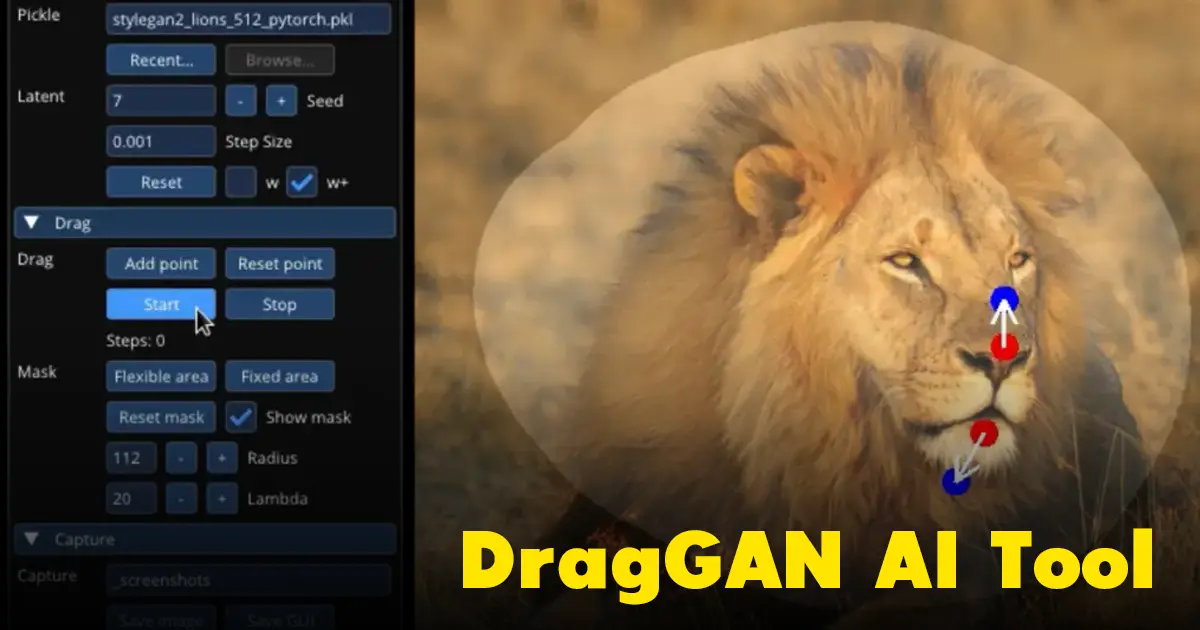
Step 4: Click “Add Points” and place your control points on the areas you want to move.
Step 5: Drag the control points to their target positions.
Step 6: Click “Start” and watch the AI reconstruct the image in real time.
Step 7: Use the mask feature to restrict which areas of the image change during editing. The main function of masks is to restrict the deformation area of the image. This feature allows for fine-tuning the details of the image, making it very convenient. Click on ‘Edit Flexible Area,’ and a circular brush will appear on the image. Use the brush to paint the area you want to deform black, then press ‘Add Points’ to add control points, and finally press ‘Start’ to view the generated result.
Limitation of this method: The Hugging Face demo works with pre-loaded model images, not your own uploaded photos. For editing your own images, you’ll need the installed version.
Method 2: Install DragGAN Locally via GitHub (Full Control)
This method requires some technical comfort, but it gives you full access to DragGAN’s capabilities including using your own images.
To set up DragGAN via GitHub and Google Colab: Search for “DragGAN AI GitHub” and find the Google Colab link. In Google Colab, change the Runtime Type to GPU as the hardware accelerator. Connect to Runtime, then Clone DragGAN Repository using: !git clone https://github.com/XingangPan/DragGAN.git. Navigate to the DragGAN directory, install dependencies with !pip install -r requirements.txt, download pre-trained weights, and launch DragGAN.
System requirements for local installation:
- Windows 10/11, macOS, or Linux
- NVIDIA GPU (strongly recommended — the AI processing is GPU-intensive)
- Python installed
- Git installed
- NVIDIA CUDA 11.8 for optimal performance
If you don’t have a powerful GPU, the Google Colab method is the better option since it runs on Google’s servers rather than your own hardware.
DragGAN vs. Traditional Photo Editing Tools
Here’s how DragGAN compares to the tools most people are already using:
| Feature | DragGAN | Photoshop Warp | GIMP | Traditional Editing |
|---|---|---|---|---|
| Ease of use | ⭐⭐⭐⭐⭐ | ⭐⭐ | ⭐⭐ | ⭐⭐ |
| Realistic results | ⭐⭐⭐⭐⭐ | ⭐⭐⭐ | ⭐⭐ | ⭐⭐⭐ |
| Speed | ⭐⭐⭐⭐ | ⭐⭐⭐ | ⭐⭐ | ⭐⭐ |
| Works on own photos | Limited (demo) | ✅ Full | ✅ Full | ✅ Full |
| Free to use | ✅ Yes | ❌ Subscription | ✅ Yes | Varies |
| Learning curve | Very low | High | High | Medium-High |
The honest comparison: DragGAN produces more realistic structural edits with dramatically less effort than any traditional tool. Where DragGAN currently falls short is in working with arbitrary uploaded images — the full experience requires local installation, and the demo is restricted to pre-loaded models.
Who Is DragGAN Best For?
Photographers and Retouchers Correcting awkward poses, adjusting expressions, fixing compositional issues — all of these become dramatically faster with DragGAN than with traditional warp and liquify tools.
Graphic Designers and Marketers Product image adjustments, character pose variations, and creative visual experiments that would require reshoots or extensive manual editing can now be done in minutes.
Content Creators and Social Media Managers Adapting images for different creative directions, generating multiple variations of a visual, and experimenting with different looks before committing to final production.
Developers and AI Enthusiasts As an open-source tool, DragGAN’s code is available for exploration, modification, and integration. Developers building AI-powered creative tools have been using DragGAN as a foundation for their own projects.
Beginners Who Want Professional Results DragGAN is user-friendly, intuitive, and has a simple interface. If you can click and drag, you can use DragGAN effectively. This accessibility is genuinely significant — it democratizes capabilities that previously required years of Photoshop expertise.
Honest Limitations and Things to Know
No tool is perfect, and DragGAN has real limitations worth knowing before you dive in.
The demo uses pre-trained models, not arbitrary images. The easiest way to try DragGAN (the online demo) works with images generated by the AI’s pre-trained models. Editing your own photos requires local installation, which has technical requirements.
GPU requirements are significant. DragGAN AI requires high-end NVIDIA GPUs for local use. If your computer doesn’t have a powerful NVIDIA graphics card, you’ll need to use Google Colab or another cloud-based approach.
Results can vary by image complexity. Simple edits on clear, well-lit images with distinct subjects produce the best results. Complex scenes with multiple overlapping elements, unusual lighting, or very fine details can produce less convincing outputs.
Still evolving. DragGAN is research technology that has been made available as a demo and open-source tool. It doesn’t have the polish or feature set of commercial software like Photoshop — but it’s also free and doing things that commercial software simply can’t.
Ethical use matters. The ability to realistically alter faces and bodies creates obvious potential for misuse — manipulating images of real people without consent, creating misleading content, or producing deceptive media. Use DragGAN responsibly and only edit images where you have the right to do so.
DragGAN in 2026: Where Does It Stand?
When DragGAN first appeared in 2023, it felt like a glimpse of the future — impressive but not quite production-ready. In 2026, the technology has matured and the ecosystem around it has grown.
The core DragGAN technology has influenced how multiple commercial tools approach AI-powered image editing. The concept of point-based, drag-to-edit manipulation has been incorporated into or inspired features in several mainstream creative platforms. In that sense, DragGAN’s impact on the image editing industry extends well beyond the tool itself.
For users who want access to the original research technology, the open-source version remains active and has been updated by the community since its initial release. The Hugging Face demo remains accessible for quick experimentation, and local installation is well-documented for those willing to invest the setup time.
The alternatives worth knowing in 2026 include Photoshop’s Generative Fill (powerful but subscription-based), various AI image editors built on diffusion models, and Canva’s AI tools (more accessible but less precise for structural edits). DragGAN’s specific approach — precise point-based control over image structure — remains genuinely distinctive even with the growth of the broader AI image editing market.
How to Get the Best Results From DragGAN
If you’re going to try DragGAN, here are the practical tips that make the biggest difference:
Start with simple edits. Your first attempts should be small, clear adjustments — slightly opening a mouth, tilting a head, adjusting a pose subtly. Once you understand how the tool responds, you can attempt more complex edits.
Use masks for precision. The mask feature is underused by beginners but essential for quality results. When you only want a specific area to change, paint that area in the mask before adding control points. This prevents unwanted changes spreading to other parts of the image.
Work in the w+ latent space for quality. Working in the ‘w+’ space results in better generation, while the ‘w’ space is faster for generating. For final results you want to use or share, choose w+ for better quality output.
Multiple small drags beat one large drag. Rather than making one large adjustment, make several smaller incremental changes. The AI handles small adjustments more gracefully than dramatic repositioning.
Choose high-resolution source images. Better input quality produces better output quality. Clear, well-lit images with good contrast give the AI more information to work with.
Final Verdict: Is DragGAN Worth Trying?
Absolutely yes — especially since it’s free.
The demo alone is worth trying just to experience what AI-powered structural image editing feels like. If you’ve only ever used traditional photo editing tools, your first DragGAN edit will genuinely surprise you. The naturalness of the results for such minimal effort is unlike anything else available.
For professional use, DragGAN currently works best as a complement to other tools rather than a replacement. Its specific strength — precise, realistic structural adjustments with minimal effort — fills a gap that other tools don’t cover as well. For everything else (color grading, complex compositing, text and graphic work), you’ll still want traditional software.
But as a free tool that does something genuinely impressive and genuinely useful? DragGAN is one of the most interesting AI tools available to image creators right now.
Give it a try. The Hugging Face demo takes 30 seconds to access and no setup to run. You’ll understand immediately why this tool caused such a stir when it first appeared.
Note: DragGAN is an open-source research tool. Features, availability, and access methods may change over time. Always download from official sources (the official GitHub repository) to avoid security risks from unofficial versions.